Maintenance and Cleaning Best Practices to Keep Air Purifiers Working Efficiently
Learn how to clean, maintain, and troubleshoot air purifiers so they deliver consistently cleaner, healthier indoor air.
Maintenance and Cleaning Best Practices for Air Purifiers
Proper maintenance and cleaning are essential to keep an air purifier performing at its best. A neglected unit can quickly lose efficiency, circulate pollutants, and even harbor mold or bacteria. By following a structured routine for filter care, exterior cleaning, and periodic deep maintenance, you can extend the life of your purifier and maintain healthier indoor air.
Table of Contents
- Why Air Purifier Maintenance Matters
- Understanding Air Purifier Filters and Components
- Safety and Preparation Before Cleaning
- Recommended Maintenance Schedule
- Best Practices for Filter Care and Replacement
- Cleaning the Exterior and Air Vents
- Interior Disinfection and Deep Cleaning
- Operating Habits that Support Clean Air and Low Wear
- Troubleshooting Common Maintenance-Related Issues
- Quick Reference: Filter Types and Maintenance Needs
- Frequently Asked Questions (FAQs)
- Conclusion
Why Air Purifier Maintenance Matters
Air purifiers constantly pull in air, trap particles, and push cleaner air back into the room. Over time, dust, hair, pet dander, smoke residues, and other pollutants accumulate in filters and on internal surfaces. If these are not removed or the filters are not replaced:
- Airflow can be restricted, reducing clean air delivery rate and efficiency.
- The motor and fan have to work harder, which can shorten the life of the unit.
- Filters may become saturated and start to release trapped particles back into the air.
- Odors may linger longer because saturated carbon can no longer absorb gases.
- In humid environments, dirt buildup can encourage mold or bacterial growth inside the purifier.
Manufacturers and filtration experts consistently emphasize that regular filter changes and surface cleaning are the core of air purifier maintenance, and that these simple routines are usually neither difficult nor time-consuming.
Understanding Air Purifier Filters and Components
Before creating a maintenance plan, it helps to understand the main components you will be caring for.
Key Filter Types
- Pre-filter: Captures larger particles like hair, lint, and coarse dust before they reach the main filter. Often washable or vacuumable and intended for frequent cleaning.
- HEPA filter: Fine particulate filter that can trap very small particles such as pollen, pet dander, and smoke. Typically not washable and must be replaced at regular intervals.
- Activated carbon filter: Contains porous carbon to adsorb odors, gases, and volatile organic compounds (VOCs). Also a consumable item that needs scheduled replacement.
- Optional stages: Some units include UV lamps, ionizers, or electrostatic plates. These require periodic inspection and, in some cases, careful cleaning or lamp replacement according to the manufacturer’s guidance.
Other Components to Maintain
- Air intake and exhaust vents: Dust build-up on grills and louvers can reduce airflow and add noise.
- Fan and internal housing: Dust can accumulate around the fan blades and in internal channels, especially if filters are overdue for replacement.
- Sensors and controls: Some purifiers use particle or gas sensors that need periodic light cleaning to remain accurate.
Safety and Preparation Before Cleaning
Most manufacturers recommend a similar set of precautions before any maintenance or cleaning session:
- Power off and unplug the air purifier before opening panels or wiping surfaces to avoid electrical shock or accidental activation.
- Allow the unit to cool if it has been running on high for an extended period, especially before interior cleaning.
- Work in a well-lit area with enough space to access all sides of the purifier and to lay out filters and panels.
- Use appropriate tools: a soft cloth (preferably microfiber), a small brush, a vacuum with a brush attachment, and mild detergent if needed.
- Avoid harsh chemicals such as solvents, bleach, or abrasive cleaners that can damage plastic housings and filter materials.
Recommended Maintenance Schedule
Exact intervals depend on model, filter type, usage hours, and air quality. However, commonly recommended schedules from manufacturers and service experts include:
| Task | Typical Frequency | Purpose |
|---|---|---|
| Exterior dusting / wipe-down | Every 1–4 weeks | Removes surface dust and keeps vents clear |
| Check and vacuum pre-filter | Every 2–4 weeks (or 1–3 months, depending on model) | Prevents clogging and extends main filter life |
| Inspect HEPA / carbon filters | Monthly | Identify heavy soiling or early saturation |
| Replace HEPA filter | About every 6–24 months | Maintains fine particle capture efficiency |
| Replace activated carbon filter | About every 3–12 months | Maintains odor and gas removal |
| Interior disinfection / deep clean | Every 3–12 months | Prevents internal dust buildup and microbial growth |
When in doubt, follow your unit’s user manual and any indicator lights or alerts that signal filter replacement or cleaning is due.
Best Practices for Filter Care and Replacement
Filters are the heart of an air purifier. The following best practices help ensure they are cared for correctly.
1. Pre-filter Maintenance
Pre-filters protect the more expensive HEPA and carbon stages, so maintaining them is cost-effective.
- Check manufacturer guidance to confirm if the pre-filter is washable, vacuum-only, or disposable.
- For washable pre-filters, gently rinse with cool water, avoid strong detergents, and allow to dry completely before reinstalling.
- For non-washable pre-filters, use a vacuum with a soft brush attachment to remove dust, hair, and lint every 1–3 months.
- Do not run the purifier without the pre-filter installed if it was designed to have one, as this may shorten main filter life.
2. HEPA Filter Care
Most true HEPA filters are not meant to be washed. Water can damage the media and compromise filtration performance.
- Inspect visually for discoloration, heavy dust loading, or noticeable deformation once a month.
- Replace according to the manufacturer’s recommended interval, commonly 6–24 months depending on usage and environment.
- If airflow is reduced or allergy symptoms worsen despite a normal schedule, consider an earlier replacement.
- Some sources suggest lightly vacuuming only the surface to extend life, but only do this if explicitly allowed by your user manual, as it can damage or tear the fibers.
3. Activated Carbon Filter Maintenance
Carbon filters gradually lose capacity as pores fill with gases and odors.
- Expect replacement every 3–12 months depending on odor load and the manufacturer’s guidance.
- Persistent cooking smells, smoke odors, or chemical smells despite normal operation are a sign that the carbon stage is saturated and should be replaced.
- Do not wash carbon filters unless the manual clearly states they are specifically designed to be rinsed; most are disposable.
4. Optional and Specialized Filters
- Electrostatic plates or filterless systems: Remove plates and wash or wipe them according to the manual, often every 1–3 months.
- UV lamps: Replace lamps according to the service life specified by the manufacturer even if they still appear to light up, as UV output declines with time.
- Ionizer components: Clean gently to prevent dust buildup around ionizing elements and collector plates; follow manufacturer-specific instructions.
Cleaning the Exterior and Air Vents
Keeping the outside surfaces and vents clean helps prevent dust from entering where filters are less effective and preserves overall airflow.
- Unplug the unit.
- Use a soft, dry or slightly damp microfiber cloth to wipe the external panels every 2–4 weeks.
- Avoid spraying cleaners directly onto the purifier; instead, apply a mild, diluted detergent to the cloth if needed.
- Use a soft brush or vacuum attachment to gently clean intake and exhaust vents, fan grills, and decorative perforations.
- Dry all surfaces with a clean cloth and allow moisture to evaporate completely before turning the unit back on.
Consistent exterior cleaning prevents dust from forming a mat over vents that can force the fan to run harder and create unnecessary noise.
Interior Disinfection and Deep Cleaning
In addition to routine filter and exterior maintenance, a periodic internal cleaning keeps your air purifier hygienic and efficient, especially in dusty or humid environments.
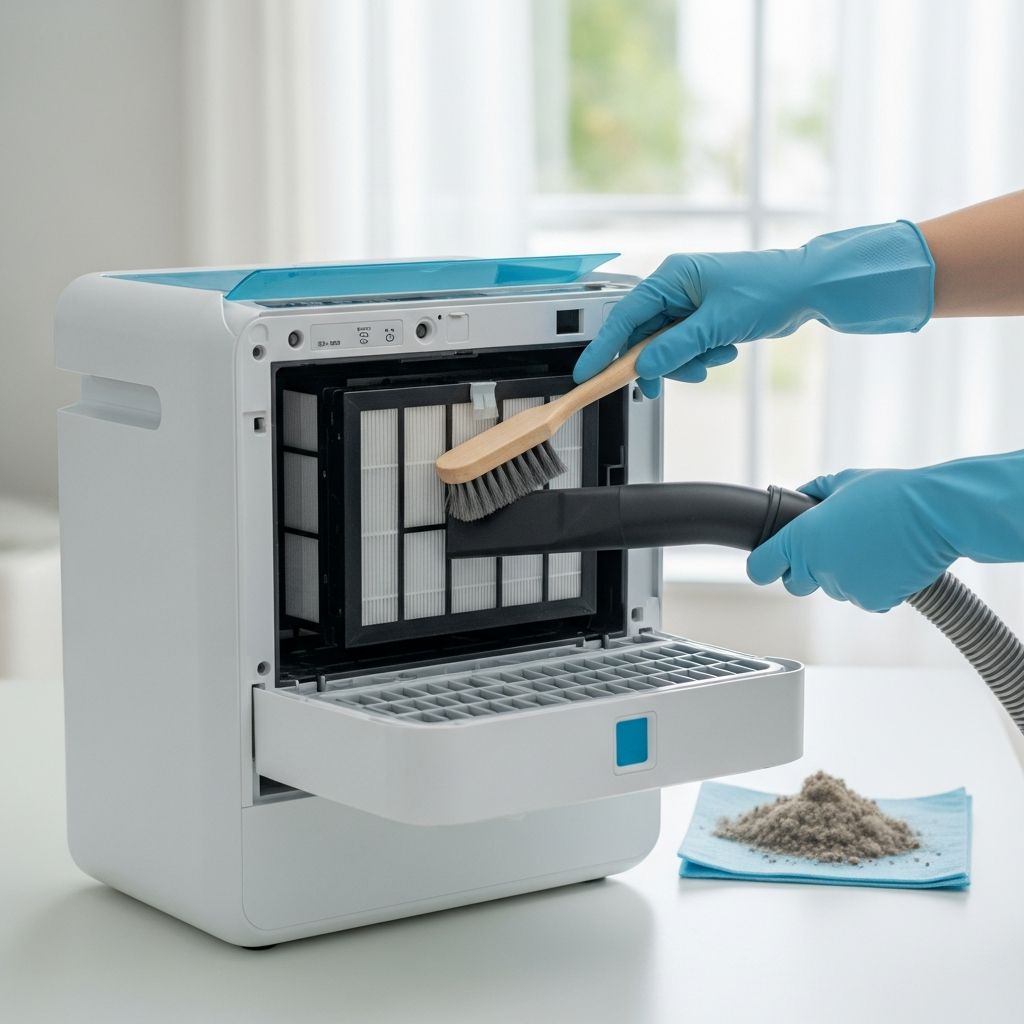
Step-by-Step Deep Cleaning Routine
- Turn the air purifier off, unplug it, and move it to an open, easy-to-clean area.
- Remove front or rear panels as directed and carefully take out all filters, noting the order and orientation.
- Use a vacuum with a hose and soft brush to remove loose dust inside the housing, around the fan intake, and near vents, avoiding direct contact with sensitive electronics.
- Dampen a microfiber cloth with warm water and a small amount of mild detergent. Wipe reachable internal plastic and metal surfaces, taking care not to saturate any area or drip liquid into motors or control boards.
- Use cotton swabs lightly dampened with rubbing alcohol to clean small crevices, edges of control panels, and buttons where grime can accumulate.
- Inspect for any signs of mold, corrosion, or damage. If growth or damage is extensive, consider professional servicing or replacement of the unit.
- Reinstall completely dry filters or new replacements. Ensure all panels and locks snap back into place securely.
- Plug the purifier back in and run it on the highest fan speed for 30–60 minutes to confirm smooth airflow and normal operation.
Many experts recommend a deep clean every 3–6 months, with at least one more intensive annual service to keep the unit running like new.
Operating Habits that Support Clean Air and Low Wear
Good day-to-day habits complement cleaning and filter changes to maximize both air quality and purifier lifespan.
- Run the purifier consistently: Air purifiers work best when operated continuously or for long daily periods, especially during allergy seasons or when pollutants are present.
- Use appropriate fan speeds: Higher speeds are useful during peak pollution events; lower speeds maintain air quietly over long periods.
- Control the room environment: Keep windows and doors closed during operation to avoid overwhelming the purifier with outdoor pollutants and to maintain effective filtration.
- Maintain general cleanliness: Regular vacuuming and dusting prevent rapid filter loading and allow the purifier to focus on finer airborne particles.
- Follow placement guidelines: Avoid placing the unit directly against walls, curtains, or furniture that block intake or exhaust vents. Most guidelines suggest several inches of clearance around all sides.
- Use reminders or logs: Set calendar alerts or use the purifier’s app or filter indicator lights to stay on schedule for cleaning and replacements.
Troubleshooting Common Maintenance-Related Issues
Many performance problems trace back to clogged filters, dirty sensors, or obstructed vents. Common issues and simple checks include:
Reduced Airflow
- Inspect pre-filters for heavy dust and clean or replace them.
- Check HEPA and carbon filters for visible clogging or dark, matted areas; replace if overdue.
- Ensure vents are not blocked by walls, curtains, or furniture.
Increased Noise or Vibration
- Dirty filters can force the fan to spin faster and louder; check and replace as needed.
- Make sure the air purifier is on a stable, level surface.
- Inspect for loose panels or incorrectly seated filters that may rattle.
Unpleasant or Persistent Odors
- Replace the activated carbon filter if smells linger despite normal operation.
- Clean the interior surfaces and check for signs of moisture or mold.
- Control source odors in the room, such as smoke or strong chemicals, and ventilate appropriately.
Filter or Service Indicator Lights
- Most indicator lights are based on run time, airflow, or sensor readings, not on a visual inspection of the filter material.
- When the light comes on, follow the recommended filter change or cleaning step, then reset the indicator according to the manual.
Quick Reference: Filter Types and Maintenance Needs
| Component | Typical Care | Usual Interval | Notes |
|---|---|---|---|
| Pre-filter | Vacuum or wash (if washable) | Every 2–4 weeks to 1–3 months | Extends HEPA and carbon filter life |
| HEPA filter | Inspect, then replace | About every 6–24 months | Generally not washable |
| Activated carbon filter | Replace | About every 3–12 months | Change sooner if odors persist |
| Electrostatic plates | Remove and wash or wipe | Every 1–3 months | Follow model-specific guidance |
| Exterior casing and vents | Wipe and vacuum | Every 1–4 weeks | Prevents dust from entering and blocking airflow |
| Interior surfaces | Vacuum and gently wipe | Every 3–12 months | Helps prevent microbial growth |
Frequently Asked Questions (FAQs)
How often should I clean or replace my air purifier filters?
Most pre-filters need cleaning every few weeks to a few months, carbon filters every 3–12 months, and HEPA filters roughly every 6–24 months, depending on usage, indoor air quality, and manufacturer recommendations. Always verify specific intervals in your user manual.
Can I wash a HEPA or carbon filter to make it last longer?
Standard HEPA and activated carbon filters are usually not washable and must be replaced when saturated. Washing can damage the fibers or carbon structure and reduce filtration effectiveness. Only wash filters that are clearly labeled as washable in the manufacturer’s instructions.
Do I need to turn off my air purifier to dust or vacuum the room?
It is generally safe and often beneficial to run the air purifier while dusting or vacuuming, because it can capture particles that become airborne during cleaning. Only power off and unplug the purifier when you are cleaning or opening the unit itself.
Why does my air purifier smell musty or dusty?
A musty smell can indicate a saturated or damp filter, dust accumulation inside the housing, or even mold growth in humid conditions. Check and replace carbon and HEPA filters if overdue, then perform an interior cleaning and ensure the room humidity is controlled.
Is it necessary to run an air purifier 24/7?
Many experts recommend continuous or near-continuous operation for best air-cleaning performance, especially in homes with pets, smokers, or allergy sufferers. If noise or energy use is a concern, using lower speeds at night and higher speeds during peak pollution times can be an effective compromise.
Conclusion
Air purifiers provide the greatest benefit when their filters are fresh, their airflow pathways are clean, and their internal components are free from dust and moisture. Maintenance does not need to be complex: a simple routine of regular pre-filter cleaning, scheduled HEPA and carbon replacement, and occasional deep cleaning of the housing keeps most units operating efficiently.
Aligning your maintenance schedule with manufacturer guidance, visible signs of wear, and changes in airflow or odor control helps balance cost, performance, and convenience. By combining good cleaning habits with thoughtful daily operation and smart placement, you can ensure your air purifier delivers consistently cleaner air and a longer, more reliable service life.
Similar Articles




Read full bio of medha deb